
Feature
A leads inbox for every enquiry your page brings
On Pro, and during the trial, every enquiry from your page lands in your leads inbox with the person's name, the number or email they left and their message, and is emailed to you as it arrives. Booking requests are counted there too, and answered in your diary.
On the basic plan the inbox shows the true number of people waiting, behind blurred cards; seeing who they are needs Pro.
What your customer sees
Send an enquiry
On your page, Send an enquiry opens a short form, on every plan. On the basic plan, and on a page with no WhatsApp number, the Message button leads there too.
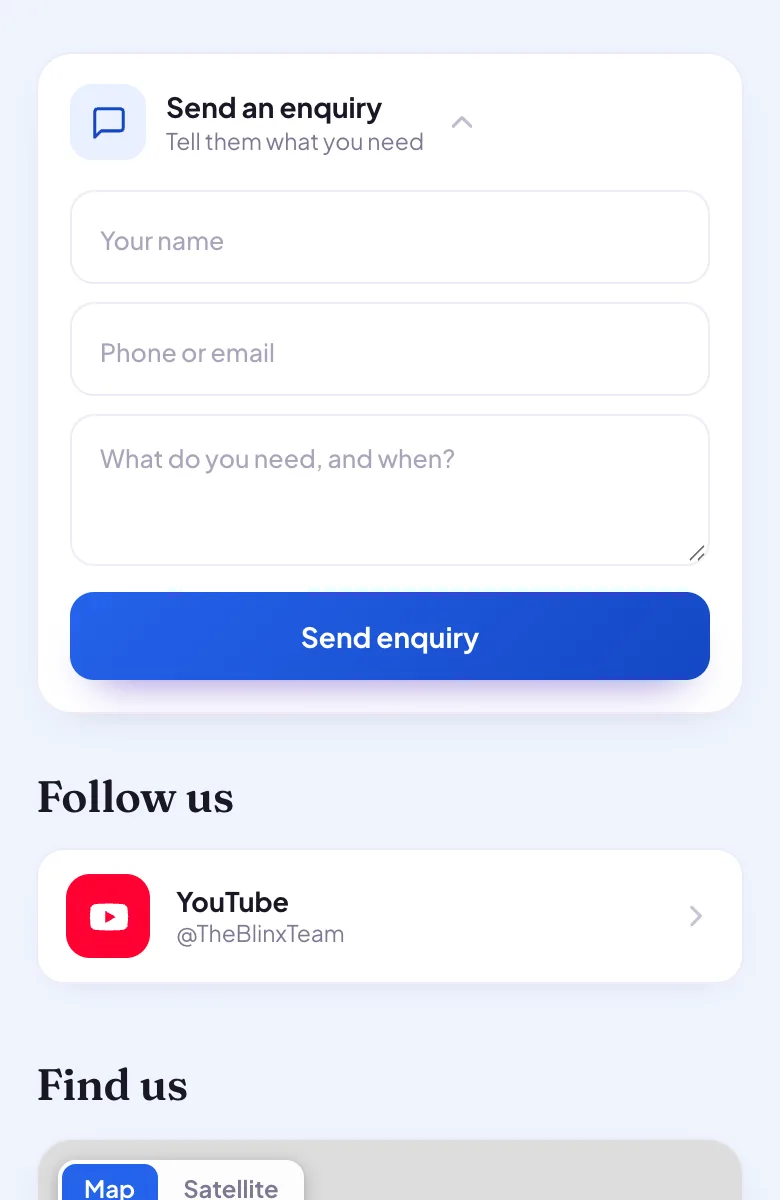
Example page, made by Blinx: Send an enquiry, open, asking for a name, a phone number or email, and what they need. Their name, number and what they need
They leave their name, a phone number or email, and what they need and when, then press Send enquiry. The page tells them it is on its way and that you have their details.
Or they reach you straight away
A customer who would rather talk taps Call now, or WhatsApp on Pro, and reaches you directly. Those taps are counted as your page's activity, not as leads.
What you see
The Leads tab in your app: your enquiries newest first, with counts of the new ones, this week's and all of them. Each shows the person's name, the number or email they left and their message, with Call, WhatsApp or Email buttons to answer them from your phone. Mark each one New, Contacted, Quoted, Won or Lost as you go.
For recent enquiries, each also shows the visitor's journey: how they arrived, for example by scanning your QR code, and what they looked at and tapped before they wrote. It is read from your page's latest 50 events.
Every enquiry is emailed to you as it arrives, with the customer's details and a button that opens it in your app: the first as "You just got your first enquiry", each after it as "New enquiry from" and their name. At most five emails about one page's enquiries go in a day, and any more wait in your inbox. Settings, "Email me every enquiry", turns them off and on, and it is on until you turn it off. A reply to one of these emails reaches the Blinx team, not your customer.
With Alerts on this phone switched on in Settings, your phone buzzes for each enquiry and the app icon counts what is waiting. On an iPhone, alerts work once Blinx is on your home screen and opened from its icon.
Booking requests are leads too: the Leads tab counts the ones waiting for your yes or no and opens your diary, where you answer them (see booking requests).
On the basic plan the Leads tab shows how many people are waiting, behind blurred cards, with your page's activity under it. No email or phone alert names anybody: the first time somebody gets in touch on a day, an email says so, and with alerts on, your phone buzzes for each enquiry without a name.
Which plan
The leads inbox is on Pro, and on every page during its trial. The enquiry form is on every plan, so customers can always write to you; on basic you see how many are waiting, not who.
| On your page | ProDuring the trial, and when you go Pro | BasicAfter the trial, at no charge |
|---|---|---|
| Enquiry form | Yes | Yes |
| Leads inbox: who got in touch, and their message | Yes | You see how many are waiting, not who |
| Booking requests from your opening hours | Yes, answered in your diary | Yes: customers can ask; seeing who asked needs Pro |
If you stop paying, your page stays
Your page stays live on the basic plan and nothing is deleted. The Pro features come back when you go Pro again.
What it does not do
- Taps on Call, WhatsApp and Directions are counted as activity, not leads, and carry no name. Somebody becomes a lead by sending an enquiry or a booking request.
- The journey shows for recent enquiries: it is read from your page's latest 50 events.
- There is no reply box in the inbox: you answer by calling, by WhatsApp or by email, from your own phone.
- Blinx does not text you about enquiries: they come by email, and as alerts on your phone.
- Blinx brings no buyers: your enquiries come from people who found your own page.
By trade
- Website for cleaners: each enquiry with the person's number and what they need, emailed to you on Pro.
- Website for removals and movers: on Pro, enquiries that say what is needed and when, in one inbox.
- Website for electricians: on Pro, each enquiry marked Contacted, Quoted, Won or Lost as the job moves on.
- Website for photographers: on Pro, every enquiry in one place, and for recent ones how the person found the page.
Questions about the leads inbox
What counts as a lead?
A person who asked for something: an enquiry through the form on your page, or a booking request. Taps on Call, WhatsApp and Directions are counted as your page's activity instead, because a tap carries no name or message. Enquiries recognised as your own tests are left out, so the number in your inbox means real people.
Will I get an email for every enquiry?
On Pro, and during the trial, yes: each enquiry is emailed to you as it arrives, with the customer's details and a button that opens it in your app. At most five go about one page in a day, and any more that day wait in your inbox. Settings, Email me every enquiry, turns them off and on.
What do I see on the basic plan?
The true number of people waiting for an answer, behind blurred cards, and your page's views and taps for the last 7 days. Who they are, what they asked and how to reach them need Pro. Nothing is deleted: when you go Pro, every enquiry that arrived is there to read.
Are my own test enquiries counted?
No. When you fill in your own enquiry form to see it work, Blinx recognises it as yours and keeps it out of your inbox, its counts and the emails about enquiries. Your page's activity leaves your own views and taps out in the same way, so the numbers you see are other people.
Can I reply from the email?
A reply to the email reaches the Blinx team, not your customer, and the email says so. To answer the customer, call or message the number or email they left, which the email shows, or press its button to open the enquiry in your app, where Call, WhatsApp and Email buttons reach them.
Try Blinx for 15 days
Your page, filled from your Google listing, ready to share as a link or a QR code.
15-day trial, no card. Nothing is deleted if you stop.